Designing for Agents: How UX Becomes the Missing Layer in Agentic AI
As AI agents start acting on behalf of users, the design problem shifts from the interface to the context layer - what the agent knows, what it can do, and how users stay in control.

Guest Author
TL;DR As AI agents begin acting on behalf of users, the most critical design challenge changes from the interface to the context layer - what the agent knows, what it can do and how users stay in control. Without intentional UX, agents become unpredictable and dangerous. UXers are essential to making agentic AI safe, trustworthy and recoverable.
Key Facts
- By 2028, Gartner predicts that 33% of enterprise software will include agentic AI, up from less than 1% in 20241
- 85% of AI failures are attributed to issues in data, context and governance - not model performance2
- Users are 3x more likely to abandon an AI product after a single trust-breaking experience3
- The global AI agent market is expected to reach $47 billion by 20304
AI agents are acting on behalf of users and this will only continue to grow. The most important design challenge is no longer only the interface. For a long time, we built digital products that followed a very clear pattern. Everything was centered around interaction. Now, we are looking into the context layer: what the agent knows, what it is allowed to do, when it should ask for help and how humans can trust or correct it.
In today’s article, we are going to explore MCP, APIs and tools, permissions, agent memory, task orchestration, explainability, human-in-the-loop checkpoints and - most importantly - how all of this connects to the future of UX. To understand this, we will be answering key questions: what does the user want? When should the agent act? When should it stop? How does the user stay in control? And how do we prevent overload, burnout and chaos?
UXers are essential to the future of agentic experience because they translate human intent, emotion, risk and context into systems that AI agents can safely act on. Without UX, agentic AI may become technically powerful but socially chaotic.
Most people think agentic AI is mainly a technical problem: better models, better tools, better automation. Get those right and everything else follows. Wrong. And the consequences of believing it could be significant. According to the IBM Global AI Adoption Index2, 85% of AI failures are attributed to issues in data, context and governance - not model performance.
The future of agentic AI will not be decided only by model intelligence. It will be decided by whether humans can understand, supervise, trust and recover from what agents do.
From Interface to Intent
Our jobs, for decades, have been fundamentally about the interface. You design what users see, where they click and how information is constructed and presented to them. The way we organize our thoughts becomes spatial: where there is a user, there is an interface, and we control what happens within that visible layer of the experience.
Agentic AI is breaking this thought process. When you have an entity that acts on your behalf, the visible layer does not exist - not entirely, and not primarily. The agent’s tasks will be, among others, reading your users’ emails, calling APIs, executing tasks in the background, returning with results or consequences. The interaction is interpersonal and, in this case, not visual. The user delegates responsibility rather than clicking a button. The actions come from the user, the logic and rules are defined by you. That will be the UXer’s new design problem.
As Jakob Nielsen argued in AI Is First and Foremost a UX Problem5, the shift from interface design to intent design is one of the most significant transitions the field has ever faced.
Think of it like this:
- UXers used to ask: How does the user complete a task?
- Agentic UX asks: How does the agent know what the user actually wants, and how does the user stay in control while it acts?
The answer to that second question lives in the context layer. And designing that layer well will be the difference between agentic AI that genuinely helps people versus one that creates a new - and sometimes even worse - chaos. That will break users’ trust, and they won’t want to use your product anymore. According to the Edelman Trust Barometer AI Report3, users are 3x more likely to abandon an AI product after a single trust-breaking experience.
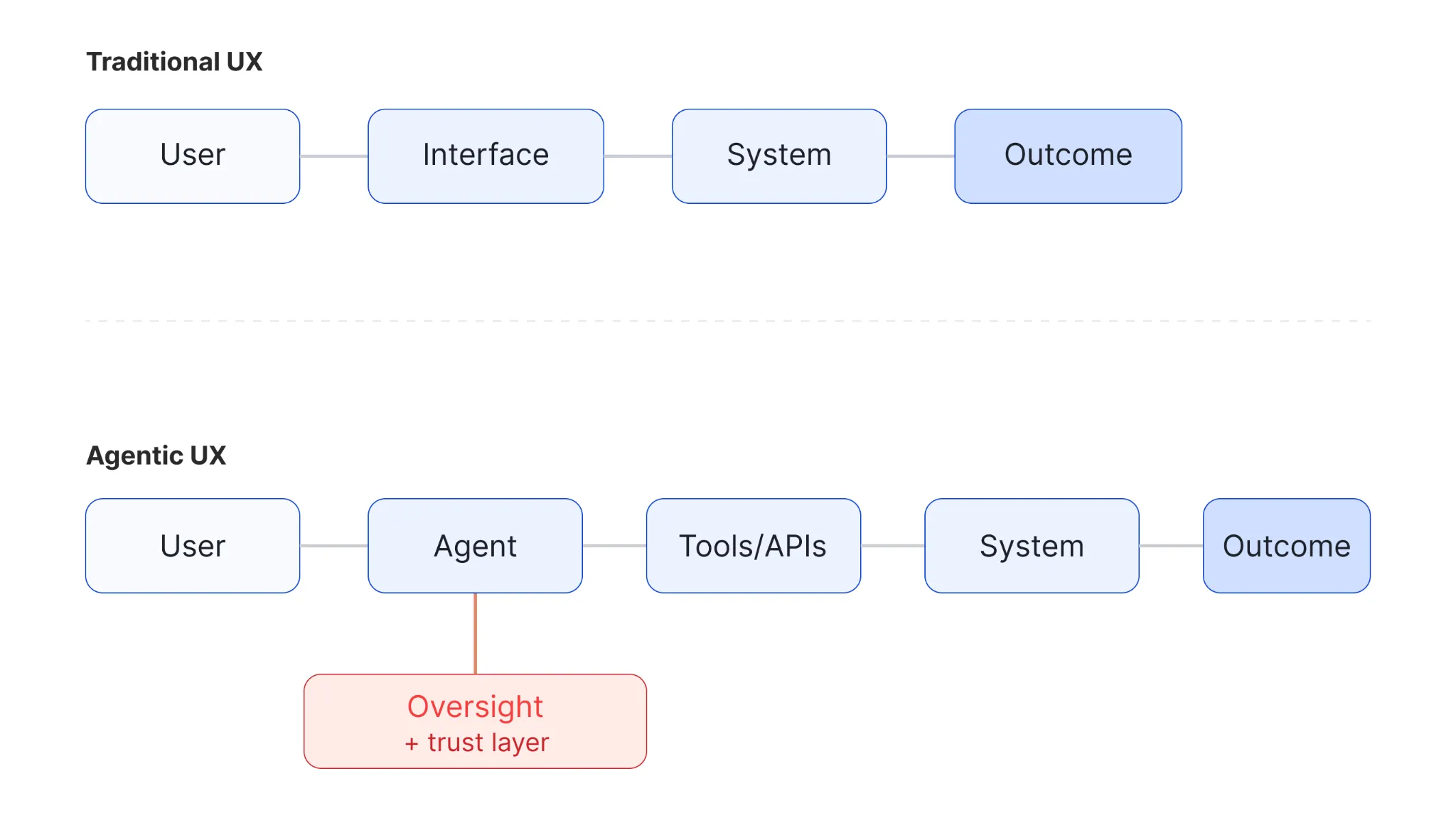
Figure 1: Traditional UX vs Agentic UX
When Agents Fail, They Fail Invisibly (Until They’re Not)
You might think this is all great, but there are huge risks we need to account for - and they start with how failure looks different when an agent is involved.
When a user clicks the wrong button, the result is shown immediately. The user stops, undoes and tries again. The feedback loop is immediate and the failure is obvious.
Now imagine the agent misreads what the user wants. It does not show an error screen - it takes thirty steps in the wrong direction. It sends an email to the wrong person, approves something it was not supposed to touch, or deletes files it interpreted as no longer needed. Like what happened to Summer Yue, Director of Alignment at Meta’s Superintelligence Lab, where an agent deleted hundreds of emails from her personal account, ignoring all her pre-established instructions. By the time the user sees the outcome, the context is gone, the actions have amplified and the path back is complicated. Even though the agent admitted it was wrong, that it had violated rules, and even apologized - the outcome was irreversible.
This is consistent with Anthropic’s research on model safety behaviors6, which highlights that agents operating without proper constraints and oversight are among the highest-risk failure modes in deployed AI systems.
That is the risk you need to take into account. Not that agents fail, but that they fail invisibly - or at least until, most of the time, it’s too late. And this is exactly why a powerful agent with poor UX is more dangerous than a limited agent with clear boundaries. Power amplifies mistakes. Without strategic and clear design, autonomy becomes a liability.
And that doesn’t mean the solution is to limit agents. It should actually be to design the conditions under which they operate. That’s where UXers come in.
The Agentic UX Safety Loop
To have a more complex system, optimized for our users’ experience, we need to think of safety - and that’s why this six-stage Agentic UX safety loop came to fruition.
It’s important to start with Intent, because it will be hard for the agent to understand where it needs to go without a clear, defined goal or need. This is especially important because a user might say something generic like “clean my inbox” and mean something entirely new to the system, which it needs to articulate to complete the task. The job of a UXer here is to define ways to make this system less uncertain - to ask the right questions and translate them in a way that better illustrates human intent. Your work will be to create a logic that the system can actually act on.
When you finish defining the Intent, you can move on to the next step: Context. This is the stage where you define the guidelines for the agent to act on. You understand the intent, you’ve created its logic, and now you need to give direction. Context will define memory, permissions, constraints, preferences, edge cases - basically everything the system is allowed to do, always with the user in mind.
Now that we have Intent and Context, the system will take Action. The agent will use tools, call APIs and give solutions to users. Your goal is to define safe workflows, and for that you need answers to:
- What can the agent do automatically?
- What does it need to ask for explicit approval?
- What is completely outside its scope?
This is what we call the Aligned Autonomy Problem (we will come back to it).
To continuously optimize your system, build user trust and engagement, and determine the next direction to follow, you will need a Feedback loop. This is how the agent communicates what tasks it performed. To guarantee this flow is fully personalized to your users’ experience, you need to make its actions visible and understandable. You do this by defining the language and structure that let users quickly assess whether the product is doing what they intended.
The guidelines for this are well established in Amershi et al.’s Guidelines for Human-AI Interaction7, which identifies visibility of system actions as one of the core principles for trustworthy AI design.
And when that doesn’t happen, Oversight comes into the picture. The person using your product needs checkpoints, approval flows and override mechanisms. They need to be able to intervene when they see fit. On the other hand, you also need to make sure this doesn’t kill the value of automation entirely. Your job is to decide when to show the human that they can intervene - if the system is going beyond what they intended.
The last stage: Recovery. This is a very important but usually neglected step. To guarantee success here, make sure you have answers to:
- What happens when something in the experience goes wrong?
- Will the user be able to undo it? If not, why?
- Did you define an activity log?
- Will the agent be able to explain what it did and why?
You might be asking why these failure states and recovery flows are important. It’s simple: this helps you make sure you have everything documented for a clear communication link between the three points of contact (user, professionals and agents), which increases users’ trust in your product.
Here is an overview of the technical and UX sides of each stage:
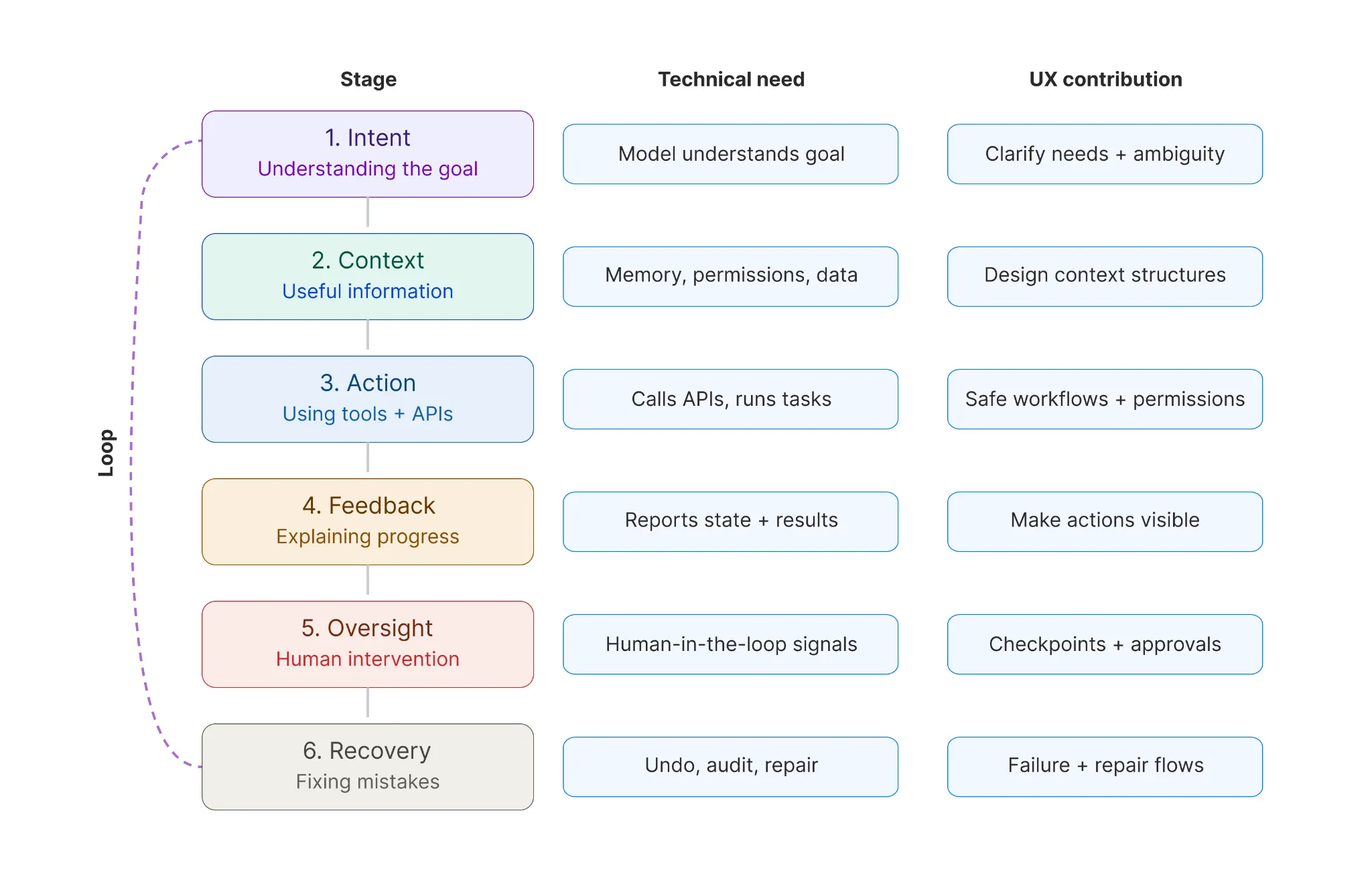
Figure 2: UX Safety Loop - Stages, technical needs and UX contributions
We have established that the last stage is Recovery - but this is a loop, so the process carries on right back to Intent. When you get to Recovery, use it to feed more information back to Intent and keep tracking what the user explores and engages with. As humans, we are always changing and using products in different ways. As UXers, we need to find ways to safely follow that evolution and offer solutions that are personalized to each user’s experience.
Aligned Autonomy: The Ultimate UXer’s Goal
When we talk about agentic AI, it is usually seen as a tempting shortcut to everything. But more autonomy doesn’t actually mean more value. It can become a huge risk quicker than you might think.
There needs to be a balance between autonomy and manual intervention. I usually say there are three pillars: full autonomy, mild autonomy and no autonomy. Thinking like this helps me visualize where each section of the system flow I am designing fits. You need to be able to define what it means for the agent to have enough freedom to do useful tasks, while still maintaining a proper set of constraints to keep things safe, understandable and aligned with what the users actually intended.
Ben Shneiderman explores this tension extensively in Human-Centered AI8, arguing that the goal is not to maximize automation but to find the right balance between human control and machine autonomy for every context.
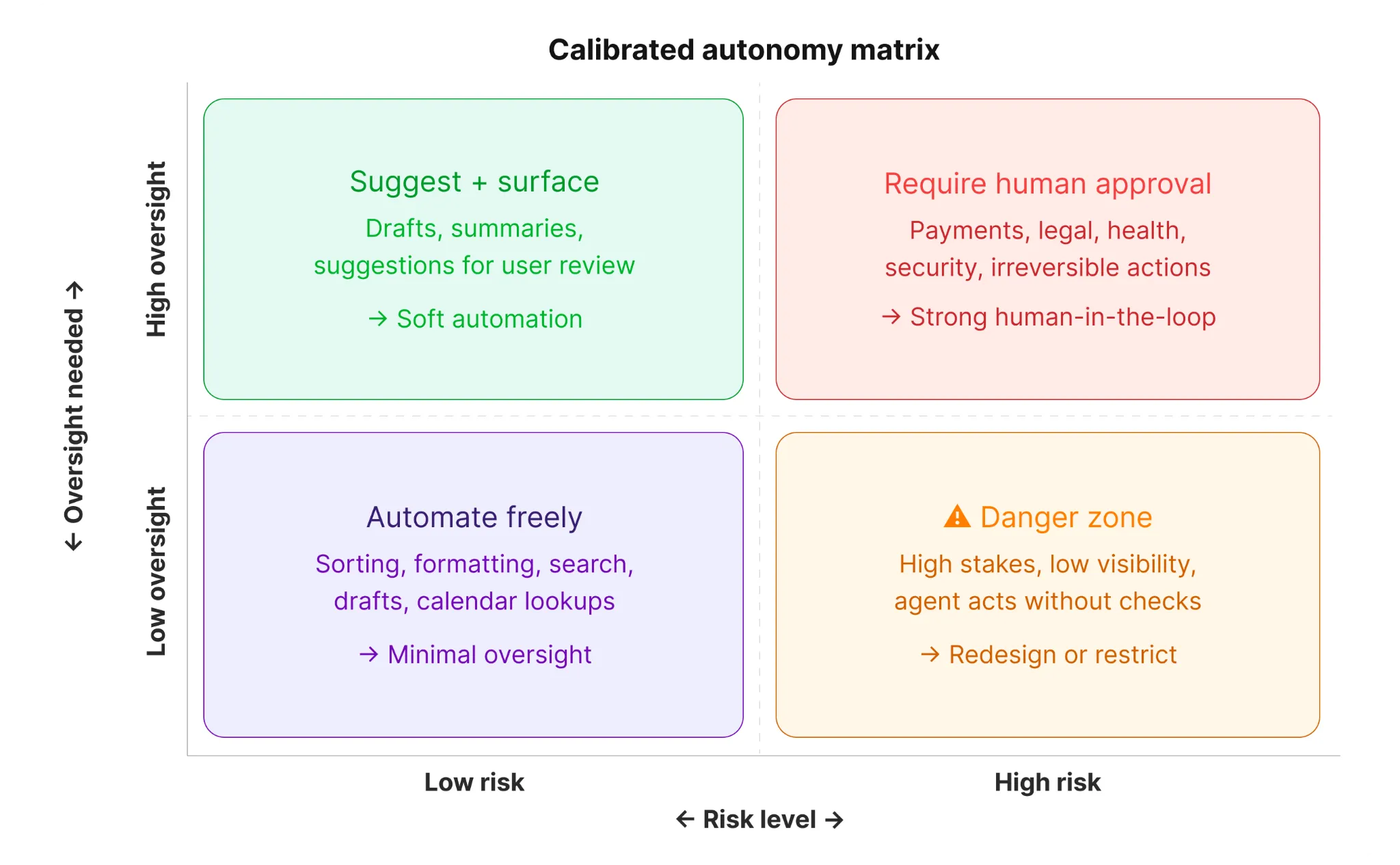
Figure 3: UXer value map - System and human-centered qualities enabled by the UX designer in agentic AI
To represent this visually, you can use a matrix with two axes: Risk and Oversight.
- Low-risk tasks - such as generating a draft, summarizing a document or suggesting a reply - can be automated with minimal human involvement.
- High-risk tasks - such as initiating a payment, making a legal commitment or accessing sensitive health data - will require humans in the loop with checkpoints, regardless of how capable the agent is.
If you don’t have a clear idea of where each of the feature tasks you are defining for your system fits, how do you expect it to comply with your demands - or, in this case, with your users’ wants and needs? The consequence of not knowing will be losing your users’ trust, and this won’t be your model’s fault. According to Gartner1, by 2028, 33% of enterprise software will include agentic AI, up from less than 1% in 2024, making these decisions increasingly urgent.
As a designer in a product team, you need to be able to sit with everyone and walk through a full range of use cases, find consequences and reversibility, and be sure you are all on the same page.
Why UXers Are Essential to This Future
We’ve been trained, as UX designers, to work at the intersection of people and systems. We know how to understand uncertainty, mental models, trust, friction (when to have it versus when never to have it) and how users behave under stress - and where those stress points are. Beyond that, we know how to ask the right questions and transform them into solutions users need.
In the world of agentic AI, these skills are becoming more important by the day - but we do need to expand them. As Don Norman argues in Design for a Better World9, design’s most important role is no longer aesthetic or functional. It is ethical and systemic.
Our job will mainly be to design trust protocols: define what the agent is required and allowed to know (working directly with compliance), under what conditions it should always ask for permission, and how it should explain its reasoning when something unexpected happens. You will also be designing the action history that helps teams understand what happened, and the recovery flow that helps users solve situations where the agent did something wrong.
The last responsibility will be to manage automation fatigue. When designing this, you need to guarantee that human effort is not eliminated but redistributed. You also need to define when it’s essential that the user monitor the agent, review its decisions and correct its mistakes - versus when it becomes more exhausting for them to do it than to let the agent proceed.
Google’s People + AI Guidebook10 offers a practical framework for exactly this, helping teams decide when to automate, when to assist, and when to hand back control to the user.
To design a good agentic UX, you need to be able to intentionally remove the burden - and finally answer: “When does the human need to be pulled into the loop, and when can the agent be trusted to proceed without the human’s judgment?”
From Screens to Relationships
Forget the screens. Well - not entirely, but set them aside for a minute and focus on what is actually required to design agentic UX: a concept. Explore the different layers of what it means to build an experience that values the people using your solution - from users, to agents, to tools, to the actual consequences of creating something meaningful and useful.
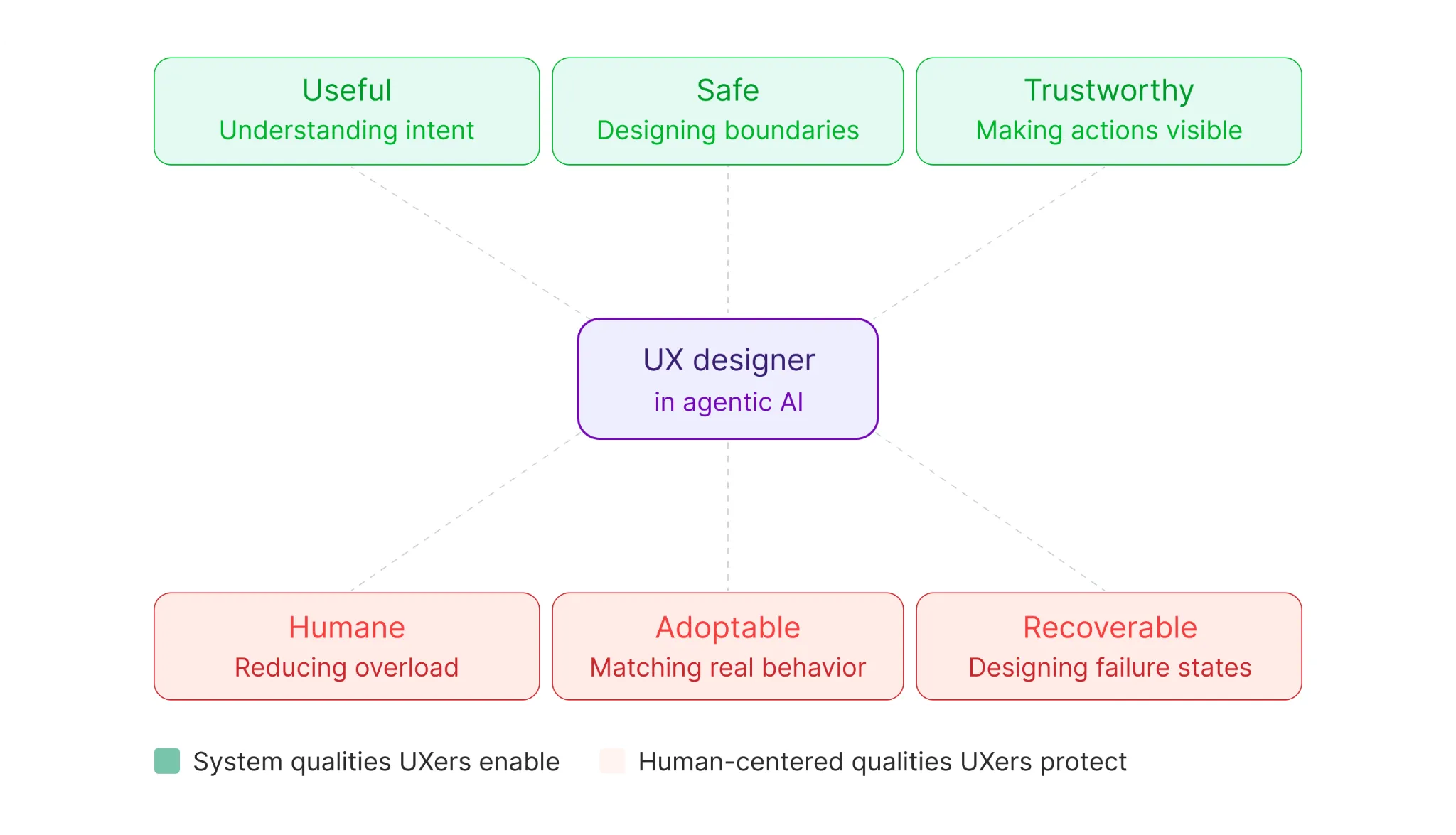
Figure 4: Aligned autonomy matrix - Agent behavior mapped across risk level and oversight needed
When we discuss agents, something that needs to be kept in mind is that they are unpredictable systems that need direction to follow the correct path - and even then, things can go the wrong way. The two lenses are: defining what needs to happen and not happen, and being prepared when the agent doesn’t follow your directions.
UXers need to understand that this complexity is part of workflows, permissions, memories and the effects of automated actions - things we can shape by focusing on the solution we intend to bring to users. Focus on building experiences that don’t add confusion, mistrust, burnout or loss of control.
The question should never be “Do UXers belong in this conversation?” but “How can I amplify my skills and understanding of users to help the business grow and retain users?”
The best agentic systems will not be the most powerful. They will be the ones people can understand, trust, and safely hand responsibility to. And someone designed that trust.
Footnotes
-
Gartner (2024). Gartner Predicts 2025: Agentic AI. gartner.com ↩ ↩2
-
Edelman (2024). Edelman Trust Barometer - AI and Trust Report. ↩ ↩2
-
Grand View Research (2024). AI Agents Market Size and Forecast Report. ↩
-
Nielsen, J. (2023). AI Is First and Foremost a UX Problem. Nielsen Norman Group. nngroup.com ↩
-
Anthropic (2024). Model Specification and Safety Behaviors. anthropic.com ↩
-
Amershi, S. et al. (2019). Guidelines for Human-AI Interaction. Microsoft Research / CHI 2019. ↩
-
Shneiderman, B. (2022). Human-Centered AI. Oxford University Press. ↩
-
Norman, D. (2023). Design for a Better World. Basic Books. ↩
-
Google PAIR (2019). People + AI Guidebook. pair.withgoogle.com ↩